
Casevoya

Set signing order and multiple signers

Choose who signs and in what order, for example consultant first, then applicant, then sponsor.

For: Firm teams4 stepsUpdated 17 Oct 2026
  1. Step 1: Open the agreement draft

    Choose Signers.

  2. Step 2: Add each signer

    Name, email and how they’ll confirm their identity.

  3. Step 3: Drag to set the order

    Or choose “Everyone at once”.

  4. Step 4: Send

    Each signer is emailed only when it’s their turn.
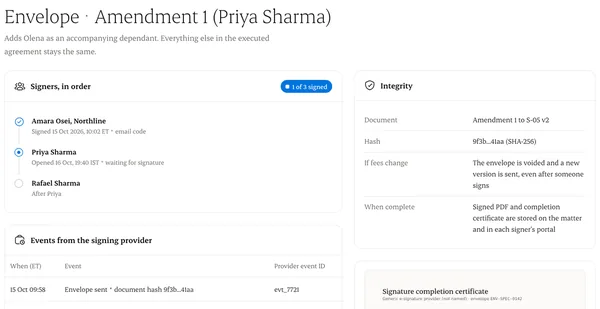
An envelope with signing order and each signer's events
An envelope with signing order and each signer's events. Sample data.

Written from the Casevoya product specification (AGR-03). Screens and wording may change before launch.