

Step 1: Create your account
Sign up with your work email and confirm it from the message we send. The link expires after 24 hours.
Step 2: Turn on two-step sign-in
Every staff account needs it before it can open client records.
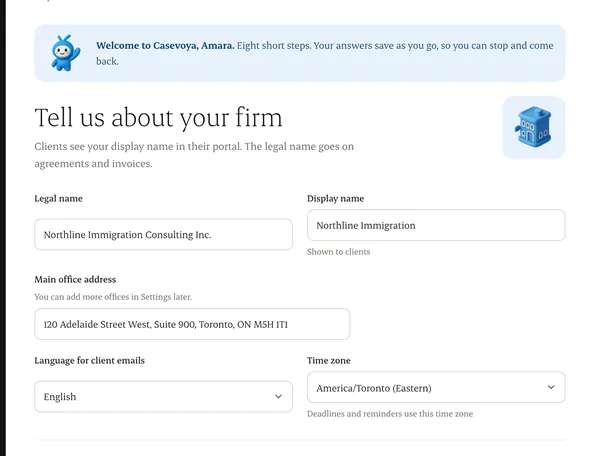
Step 3: Enter your firm details
Legal name, display name, offices, the jurisdictions you cover, a billing contact, a privacy contact, your language and your time zone.
Step 4: Accept the terms
Accept the subscription terms and the data-processing terms, and name who answers privacy questions.
Step 5: Configure the basics
Add branding, roles, service templates, calendar, payment destination and retention policy.
Step 6: Run a sample case
Take one fictional client from intake through agreement, upload, reminder, invoice and export.
Written from the Casevoya product specification (Firm activation 1–6, ORG-01). Screens and wording may change before launch.